

A single-engine aircraft takes off from a red dirt strip, trailing dust

Flying club and flight school software,
made this decade.

Founding offer

Open to the first 15 clubs and schools.

Scheduling, dispatch, billing and maintenance for flying clubs and flight schools.

Features

1/4

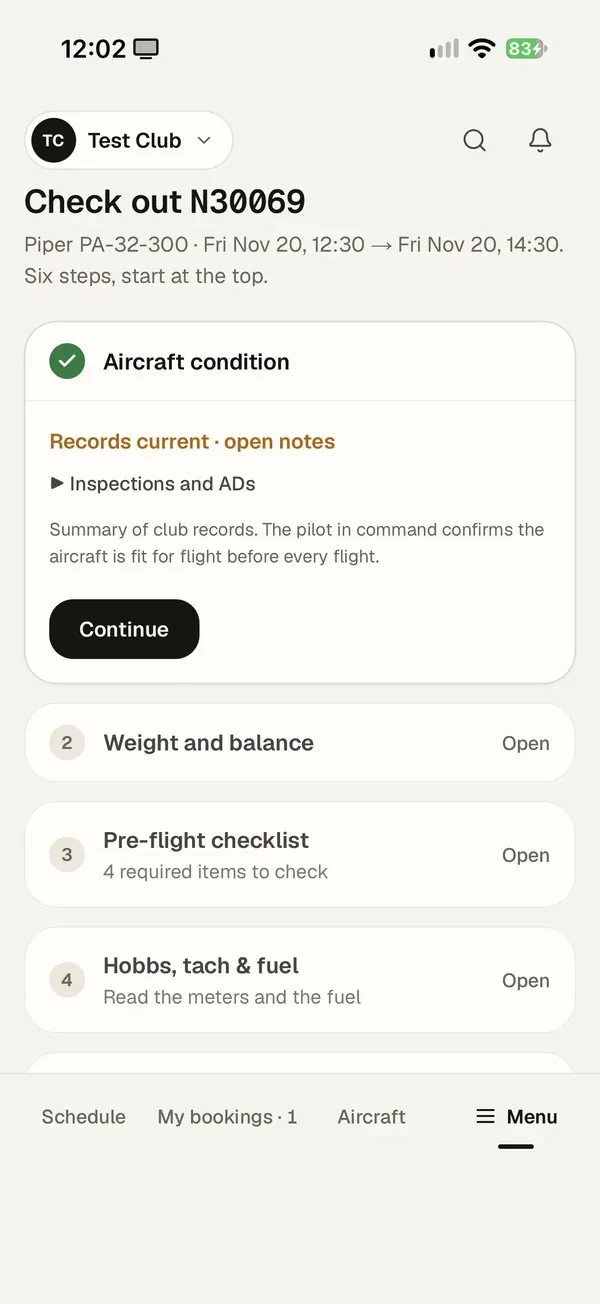
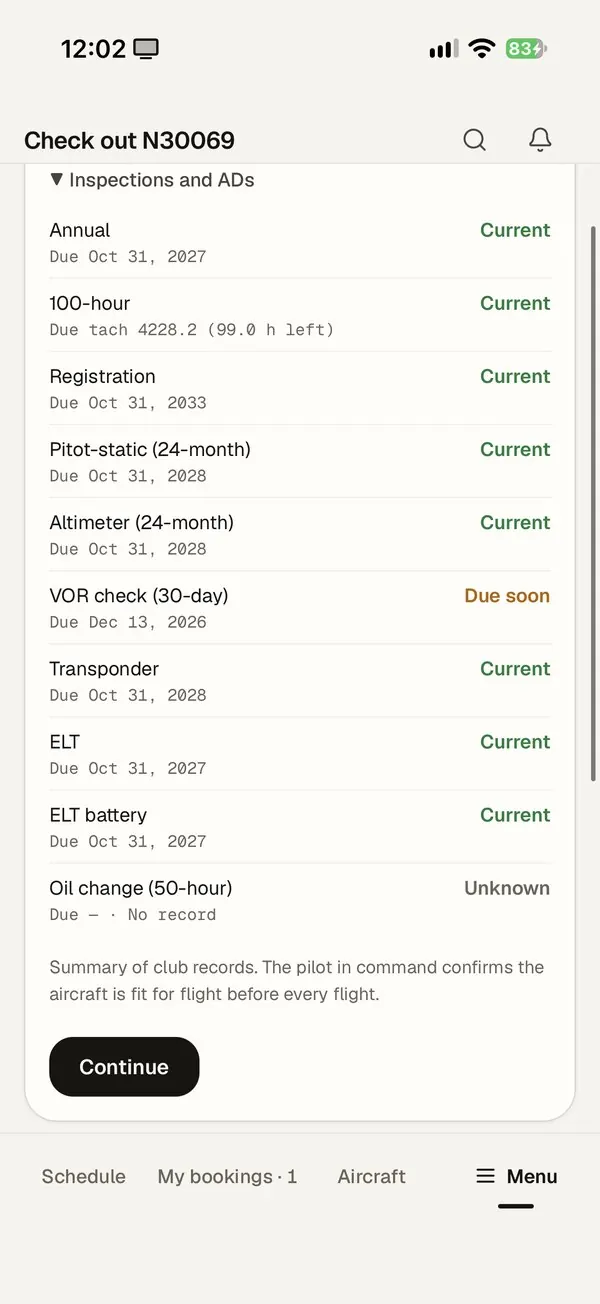
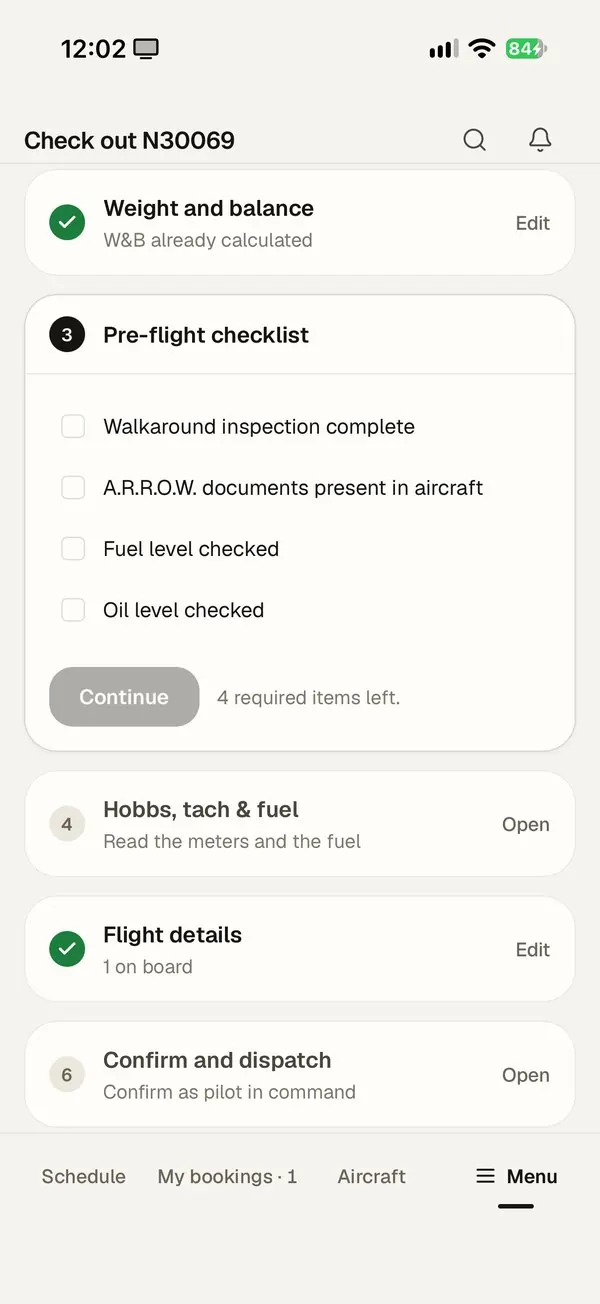
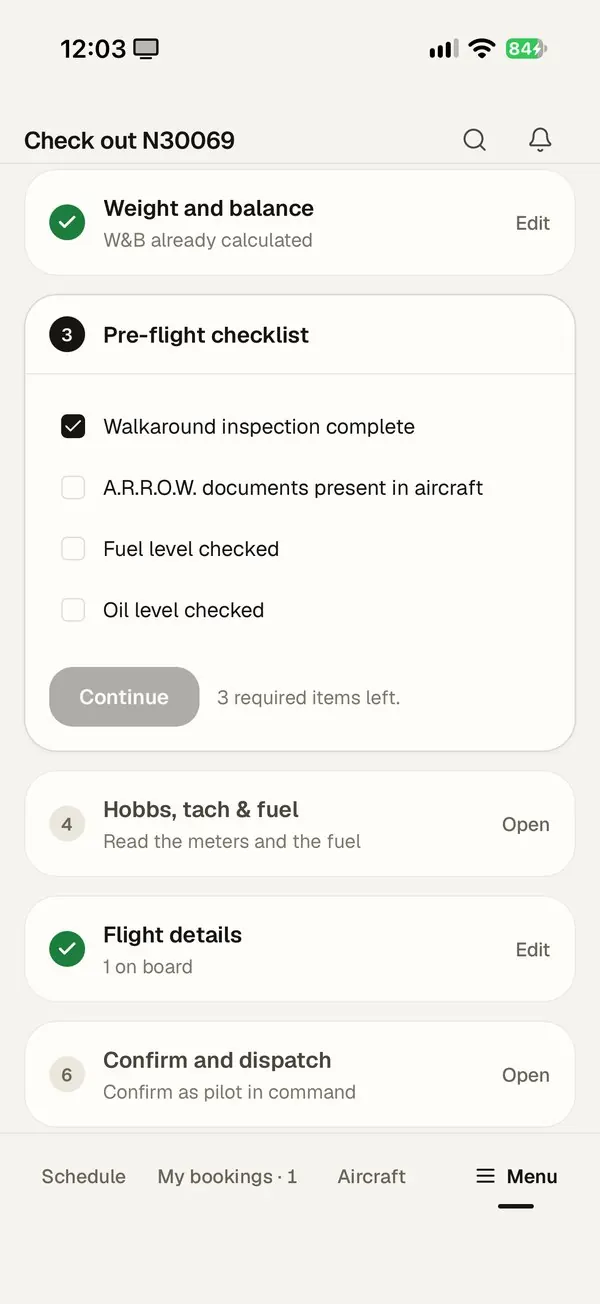
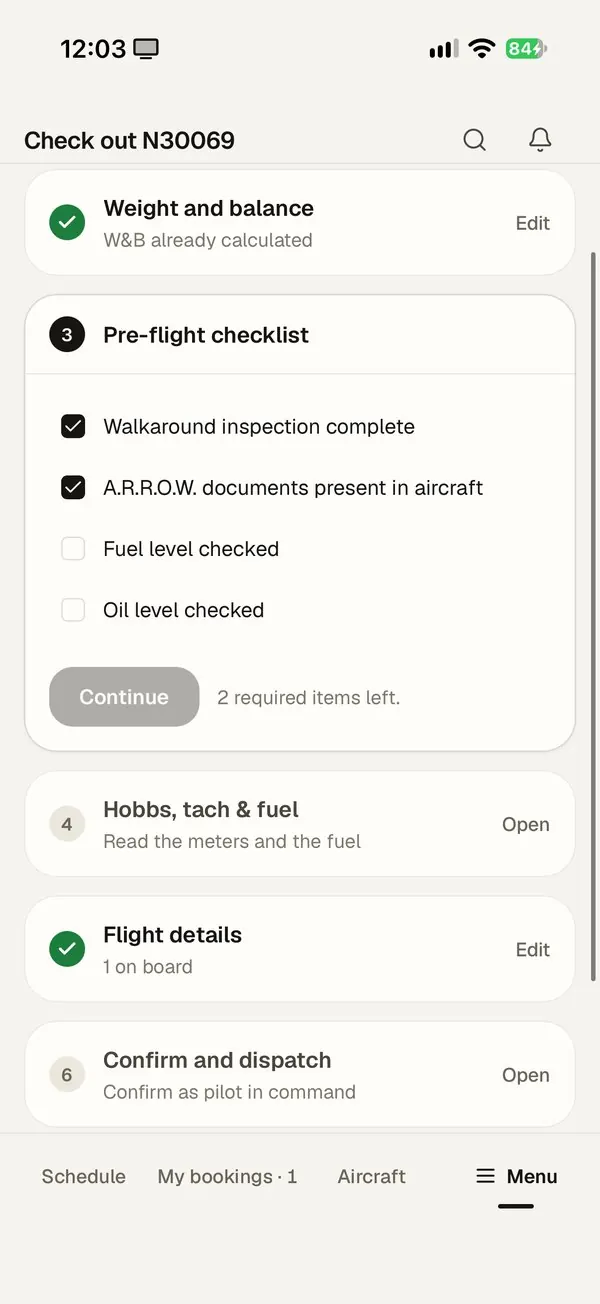
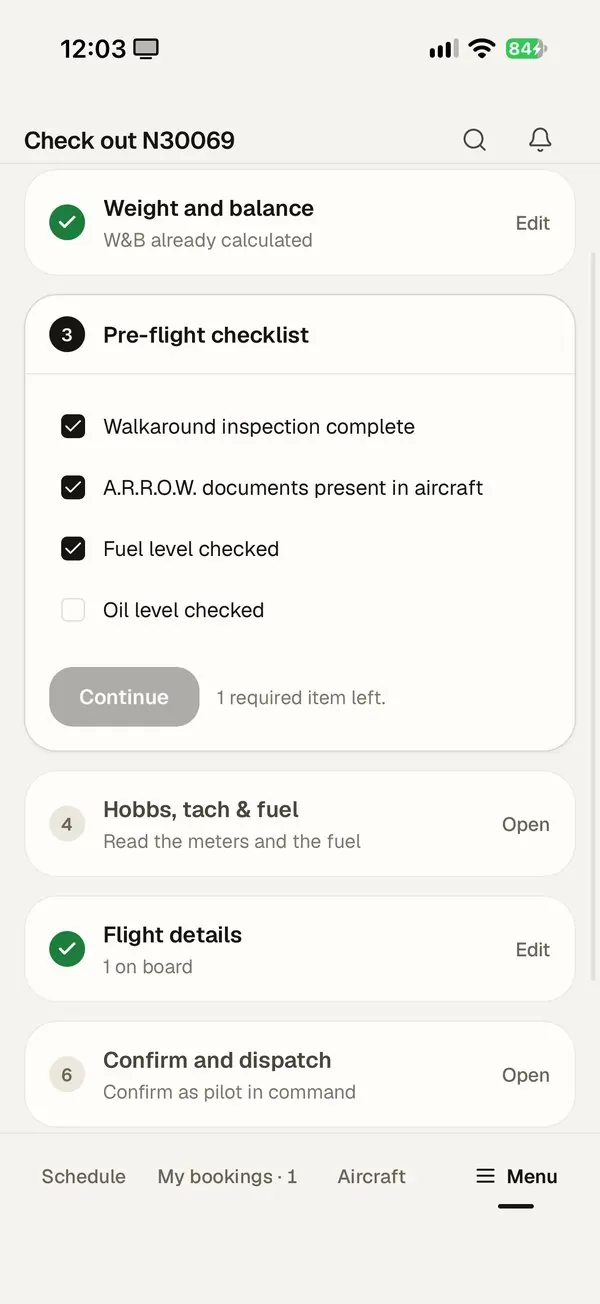
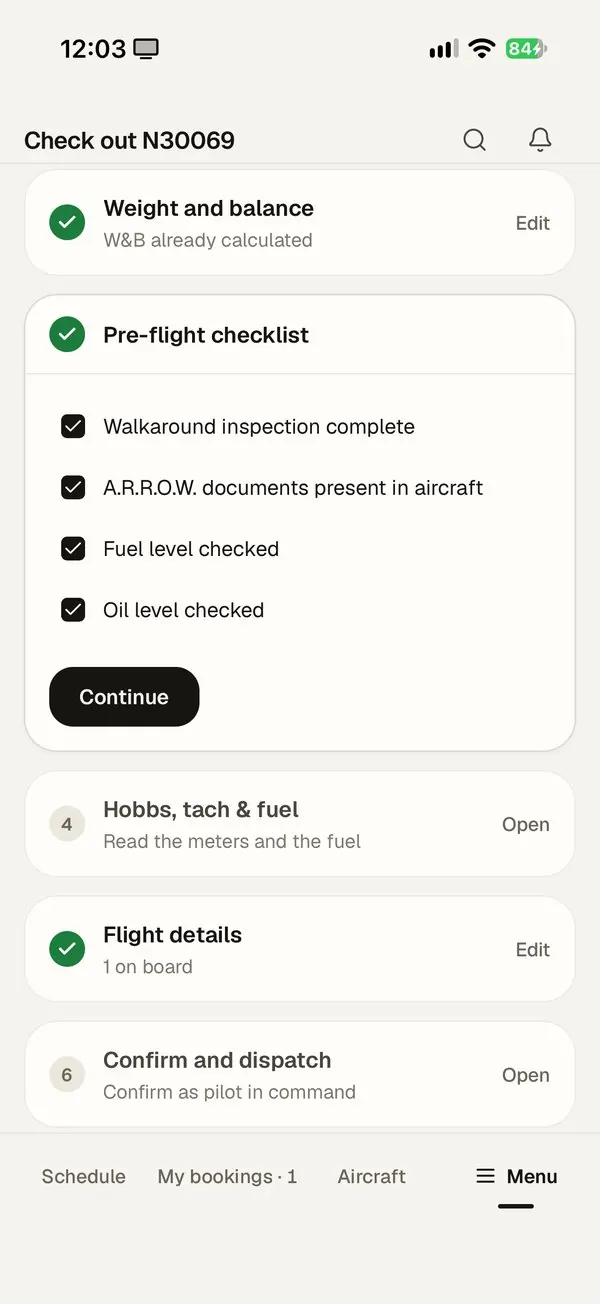
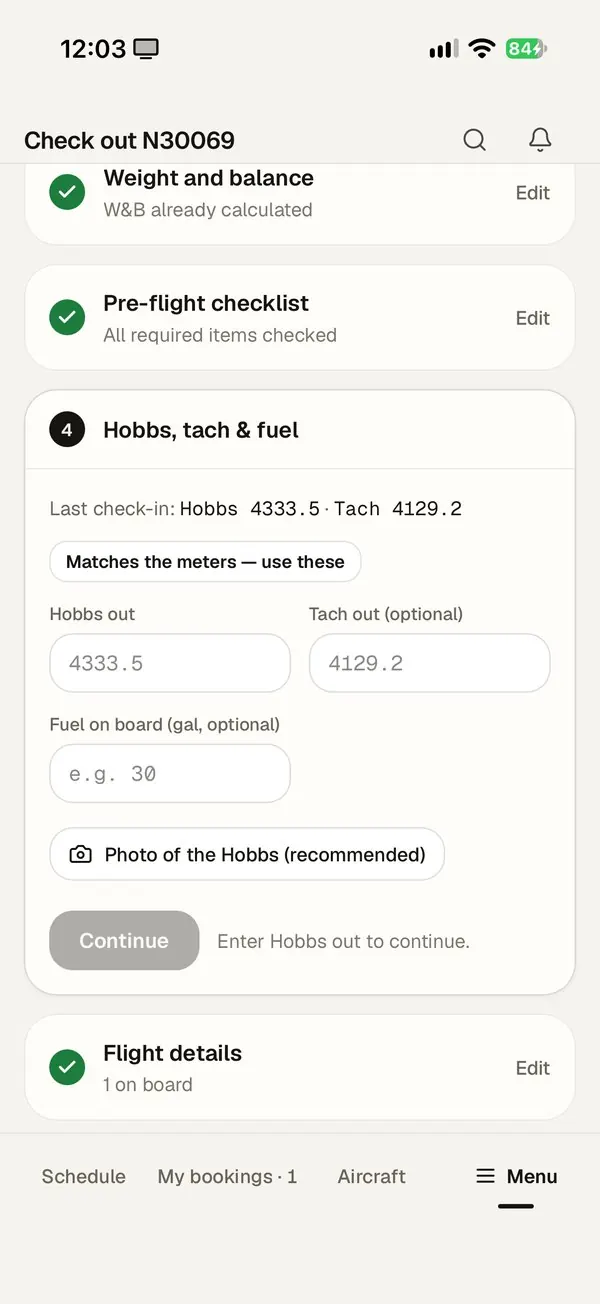
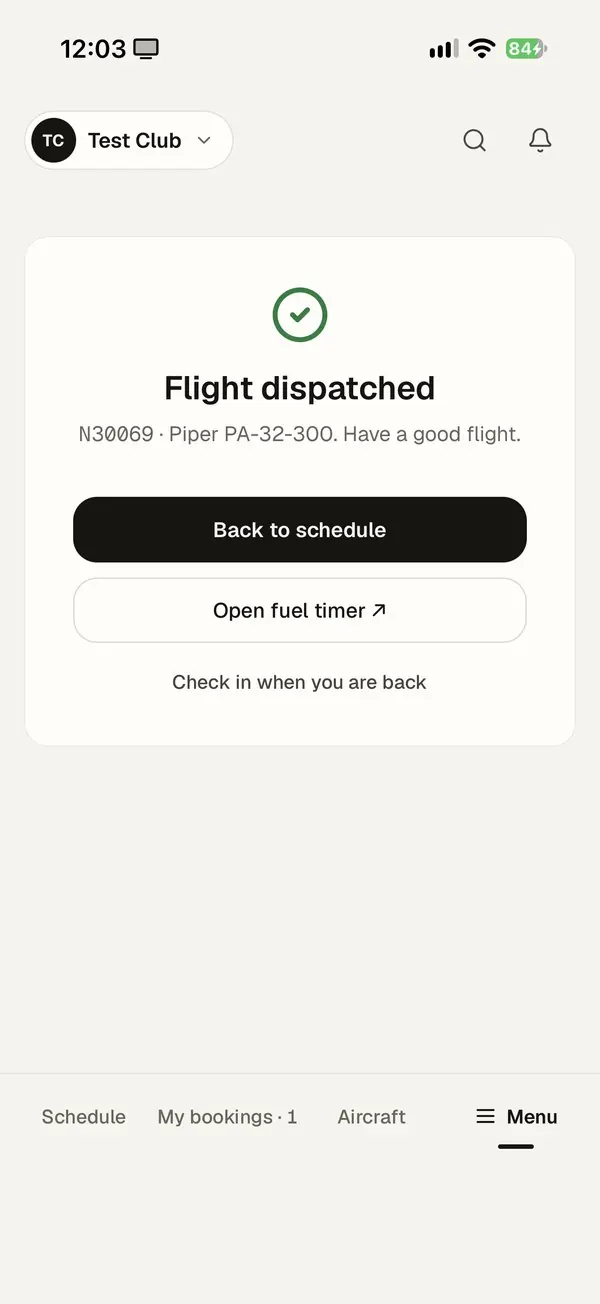
Check-out and check-in

Hobbs, tach, fuel and squawks. The flight goes on the bill at check-in.

  1. Aircraft condition
  2. Pre-flight checklist
  3. Hobbs, tach and fuel
  4. Flight dispatched
2/4

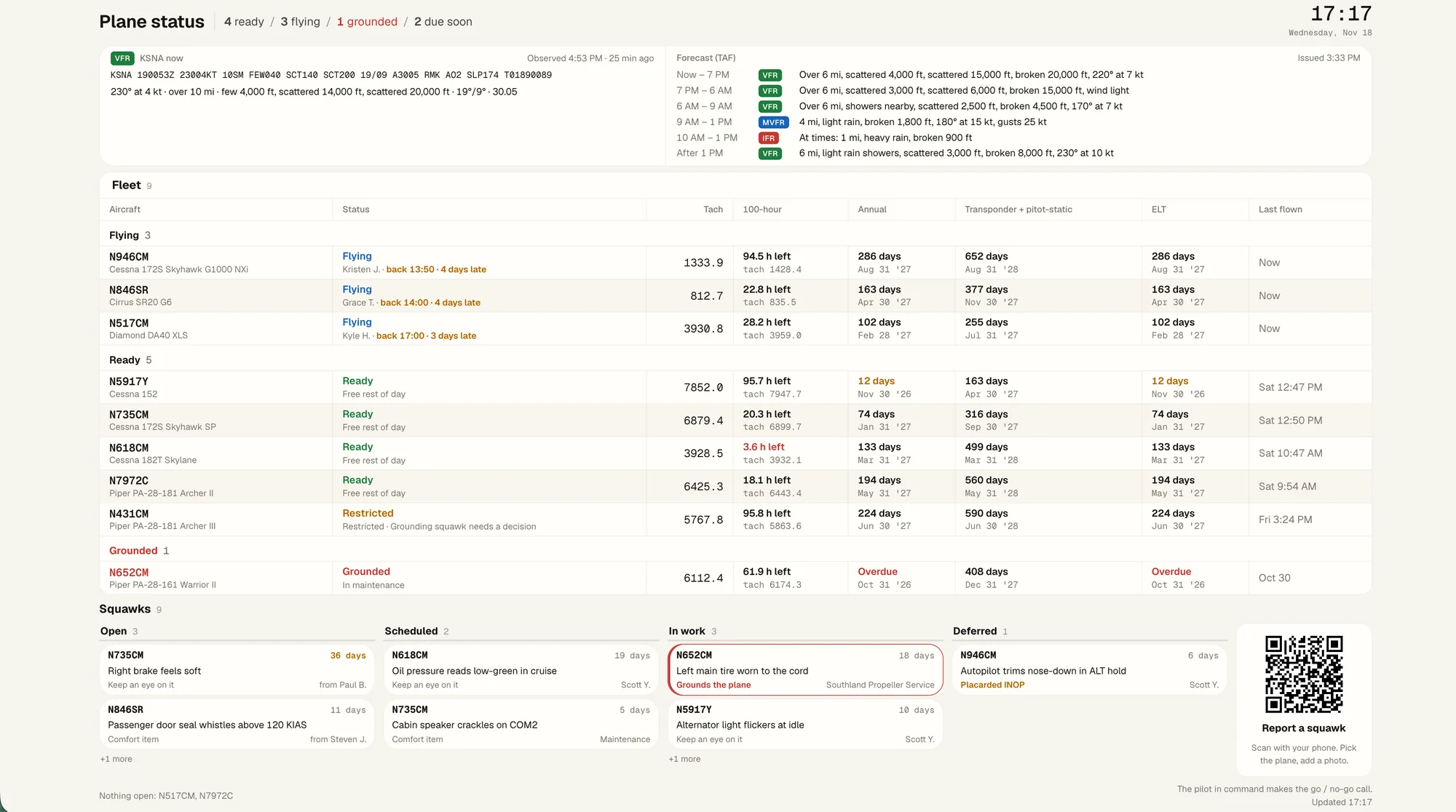
Plane status

Every aircraft with its inspections, open squawks by fix stage, and home-field weather.

  • 100-hour and annual due dates by tach
  • Squawks: open, scheduled, in work, deferred
  • METAR and TAF for your airport
Plane status: fleet inspections, squawks by stage and weather
3/4

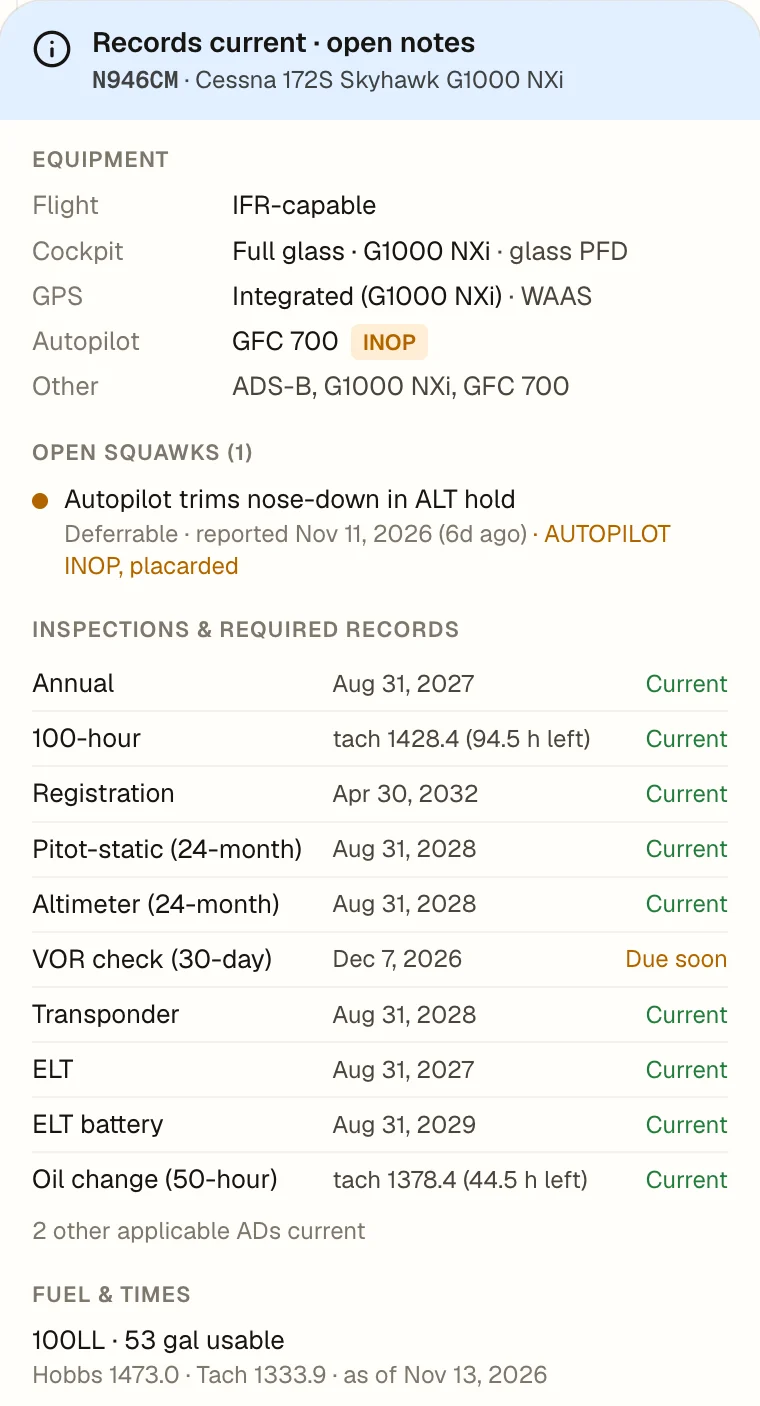
Aircraft records

Equipment, open squawks, inspections and required records for each aircraft.

  • AD tracking
  • Work orders, parts and costs
  • Fuel, Hobbs and tach
An aircraft record with equipment, an open squawk and inspection dates
4/4

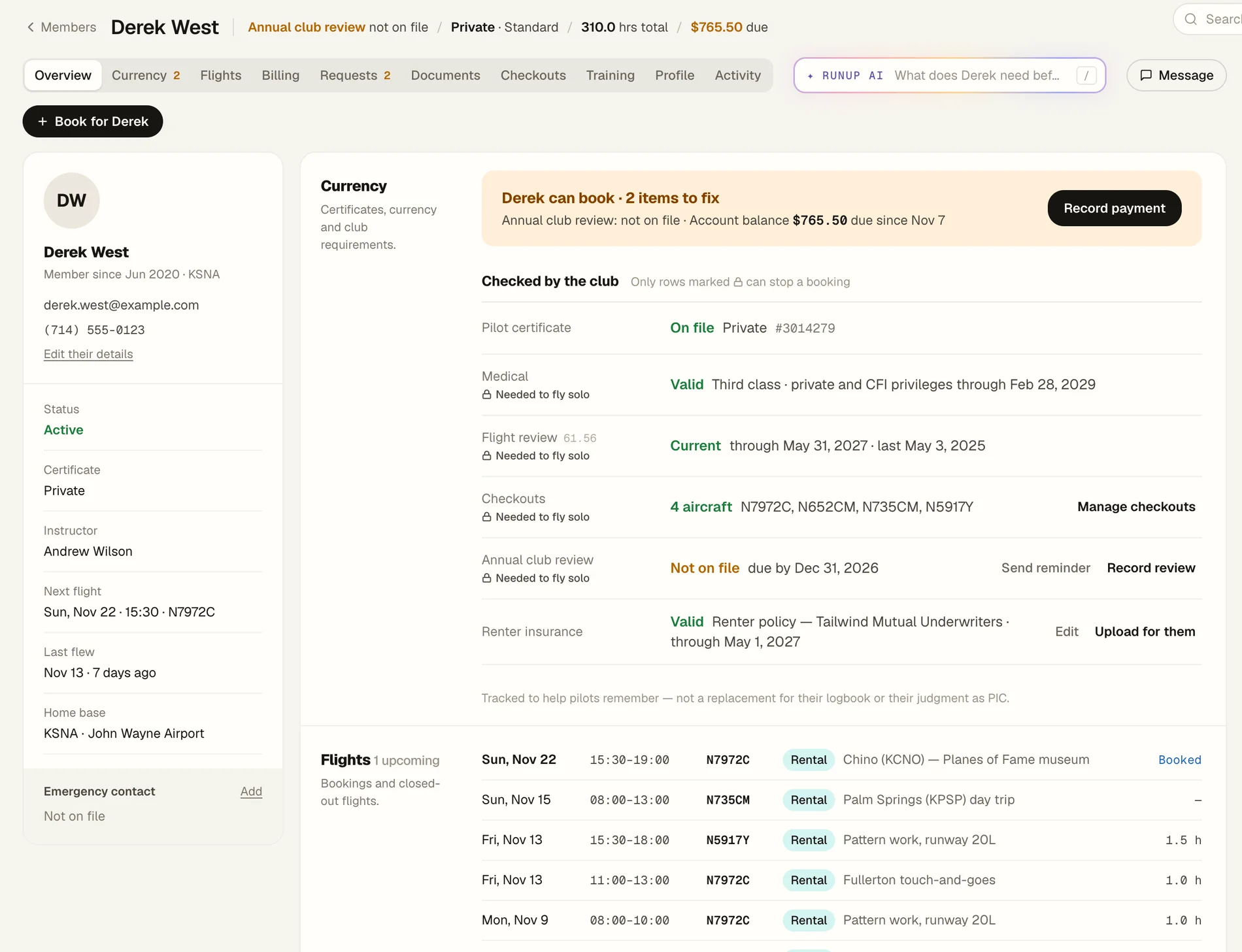
Member records

Medical, flight review, currency, checkouts and endorsements on one profile.

  • Reminders before they expire
  • Club rules can block, warn or inform
  • One login for a pilot in several clubs or schools
A member record: currency, medical, flight review, checkouts and flights

Runup AI.

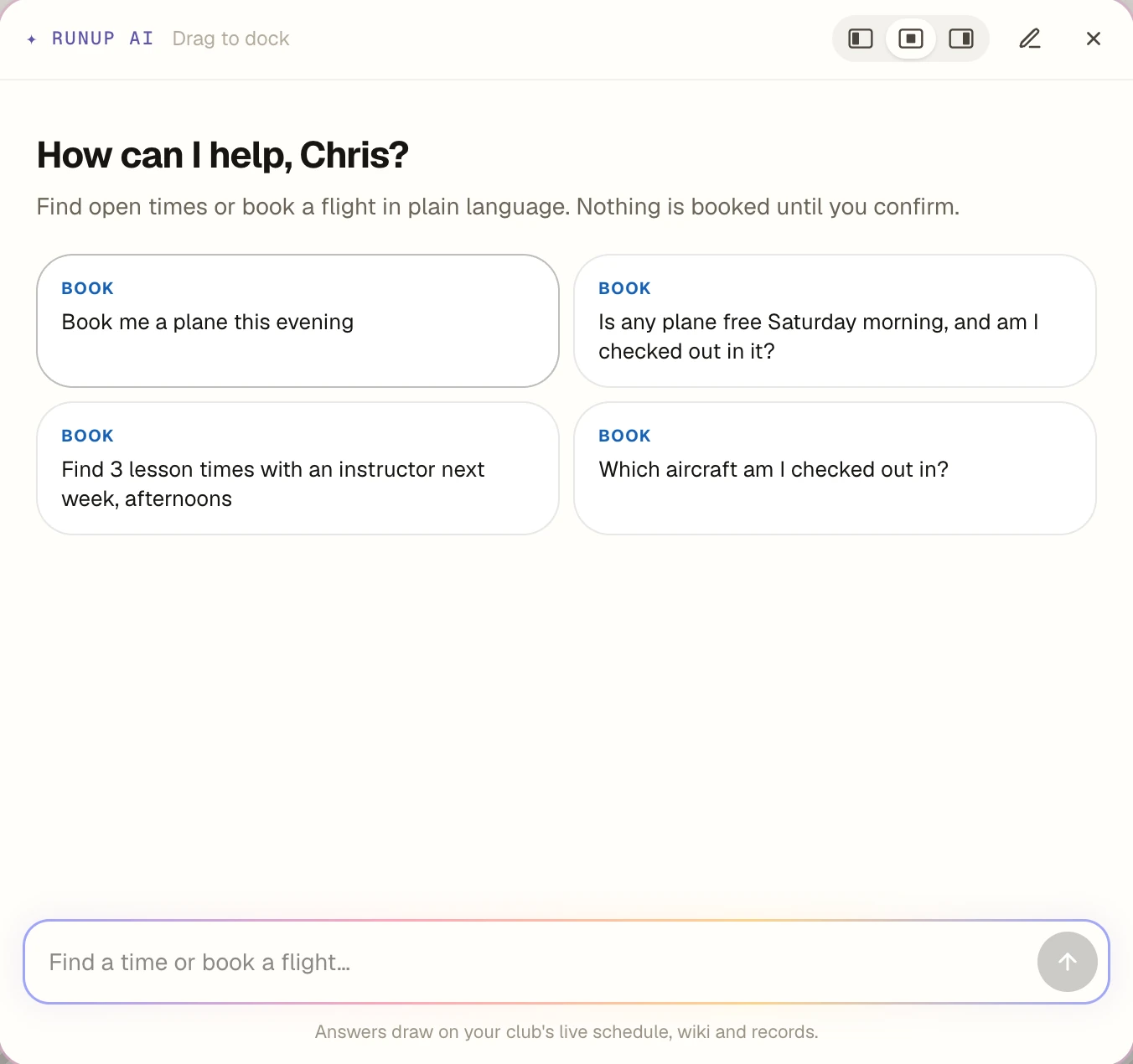
Built into every part of Runup. Ask it a question, or give it a task.

It reads the schedule, the wiki, rules, policies, billing and maintenance records. It knows each pilot's certificates, ratings and checkouts. Each person sees only what their role allows.

The Runup AI panel with four example requests

Your own data

The schedule, wiki, rules, policies, billing and maintenance records of your club or flight school.

Permissioned by role

A student or member sees their own information. A treasurer or chief pilot sees more.

MCP server

Connect your own AI tools to your club or flight school.

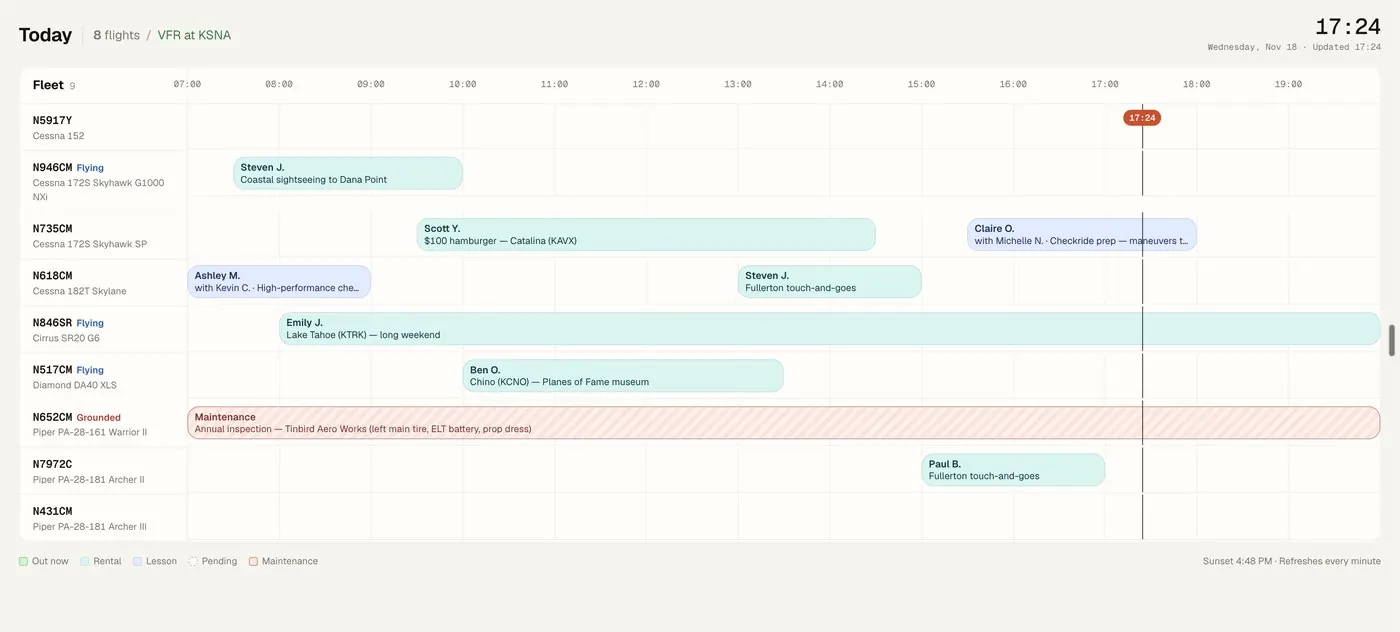
Today board

See today’s flights across the fleet.

Displayed in real-time on an office TV or monitor for everyone to see.

Plane status

See each aircraft’s inspection status, open squawks and repair progress, alongside weather at its home field.

Display it on an office TV or monitor.

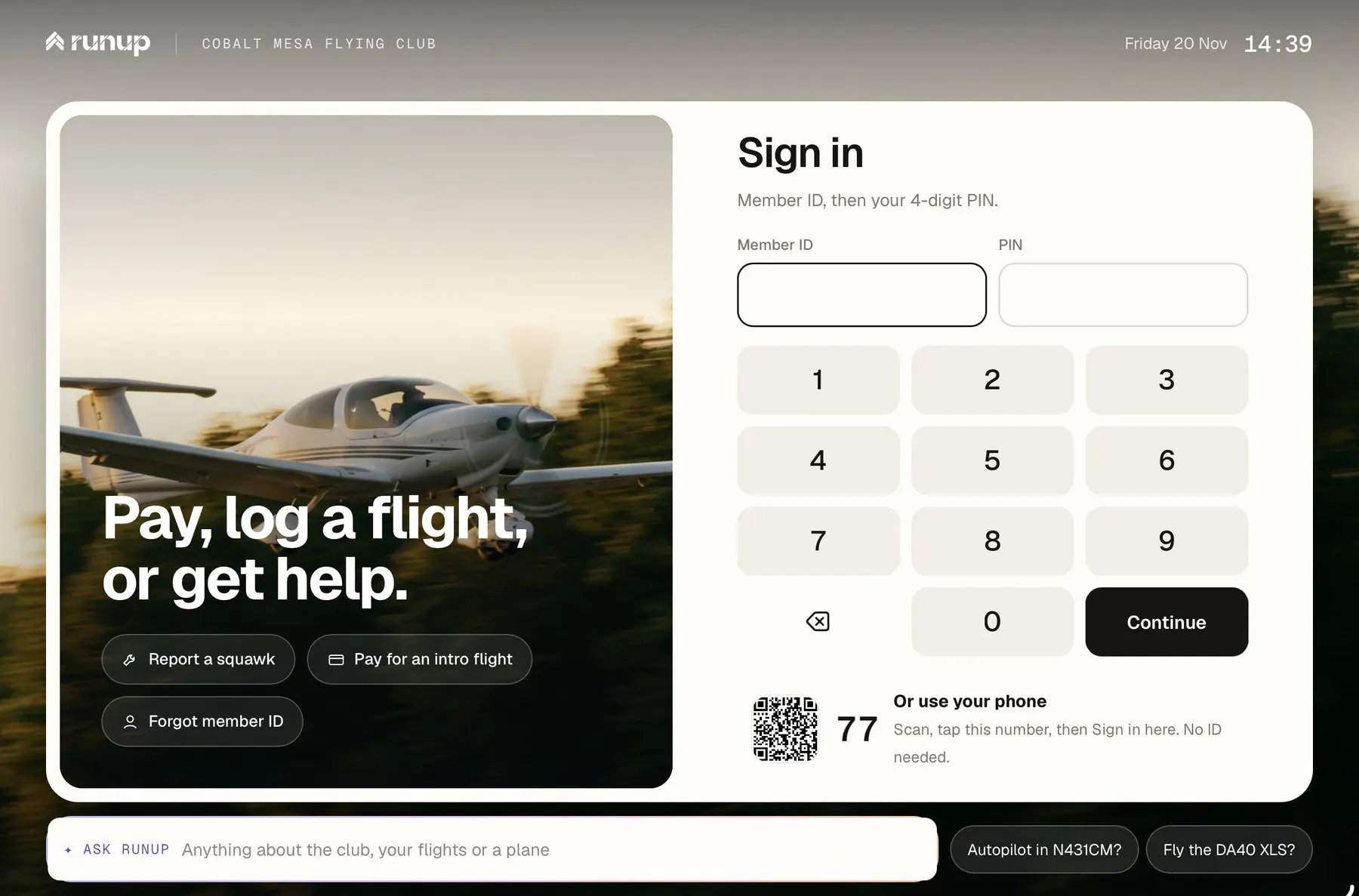
Front desk

Students and members enter their ID and PIN to pay, log a flight or request help.

Designed for a flight school’s counter iPad.

The Today board
Plane status
The front desk sign-in screen

Switching to Runup

We’ll import your data and set up Runup before you switch over.

Old system

  • Flight Schedule Pro
  • Schedule Master
  • Flight Circle
  • AircraftClubs
  • Any other system
Runup

Our team can import data from nearly any source.

Data we import

  • Schedules
  • Aircraft details
  • Maintenance records
  • Member and student information

How it works

  1. 1

    Get started

    You fill in a short form. We book your onboarding call.

  2. 2

    Roadmap

    We make an onboarding roadmap and set a go-live date.

  3. 3

    Migration date

    We arrange a time to migrate your data.

  4. 4

    Migration

    We export your data from your old system, import it into Runup, and check it with you.

  5. A few days to two weeksDepending on fleet size, the number of people, and how much historical data you need imported.
  6. 5

    Runup AI setup

    We build your wiki with you and import your FAQs, pricing, and membership or training policies. We set what the assistant can access and share, and configure it for your club or flight school.

  7. 6

    Review and training

    Before launch, we review the assistant’s answers and permissions with your chief pilot or lead administrator. Then we give them a short training session on how to maintain it.

  8. 7

    Go live

    On the go-live date, we do the switchover.

  9. 8

    Support

    After go-live, we monitor and support you.

Pricing

One price per aircraft. Unlimited members.

Founding price
For the first 15 clubs and schools. Locked for as long as you stay, on yearly billing.
Yearly billing
Pay 10 months, get 12.
Card payments
They go to your own Stripe account. Runup takes no share of them. Prices in US dollars.
Your total
Set your number of aircraft.
Calculate total pricing
Sandbox
Try Runup first. Start Demo

Basic

Owners, partnerships and one-plane clubs.

$10/ aircraft / month

Up to 3 aircraft.

Start with Basic

Includes

  • Booking calendar
  • Check-out and check-in with Hobbs and tach
  • Squawks
  • Maintenance due dates and ADs
  • Digital aircraft records
  • Pilot currency reminders
  • Invoices
  • Reports
Up to 3 aircraftSelf setup.

Club

Flying clubs.

$27$29$29/ aircraft / month

Founding price, locked on yearly billing. 3 aircraft minimum.

Get Started

Everything in Basic, plus

  • Runup AI
  • Advanced scheduling with instructors and standby
  • Work orders and parts
  • Live tracking
  • Card and ACH payments
  • Wiki, applications and forms
  • MCP server and API
  • We move your data for you

Add-ons

TV boards$19 per month

Front desk + TV boards$39 per month

200 Runup AI requests per aircraftEvery month. Shared by all members.

School

Flight schools.

$41$59$59/ aircraft / month

Founding price, locked on yearly billing. 3 aircraft minimum.

Get Started

Everything in Club, plus

  • Training records, debriefs and CFI notes
  • The front desk screen with card reader and intro flight payments
  • TV boards for Plane Status and Today
200 Runup AI requests per aircraftEvery month. Shared by all members.
Compare all features
FeatureBasicClubSchool
Plan
Price per aircraft, per month$10$29$59
Founding price per aircraft, per month. First 15 clubs and schools. Locked for as long as you stay, on yearly billing.No founding price$27$41
Aircraft1 to 33 minimum billed3 minimum billed
Members, students, instructorsNo limitNo limitNo limit
Runup AINot included200 requests per aircraft, per month200 requests per aircraft, per month
Yearly billingPay 10 months, get 12Pay 10 months, get 12Pay 10 months, get 12
Features
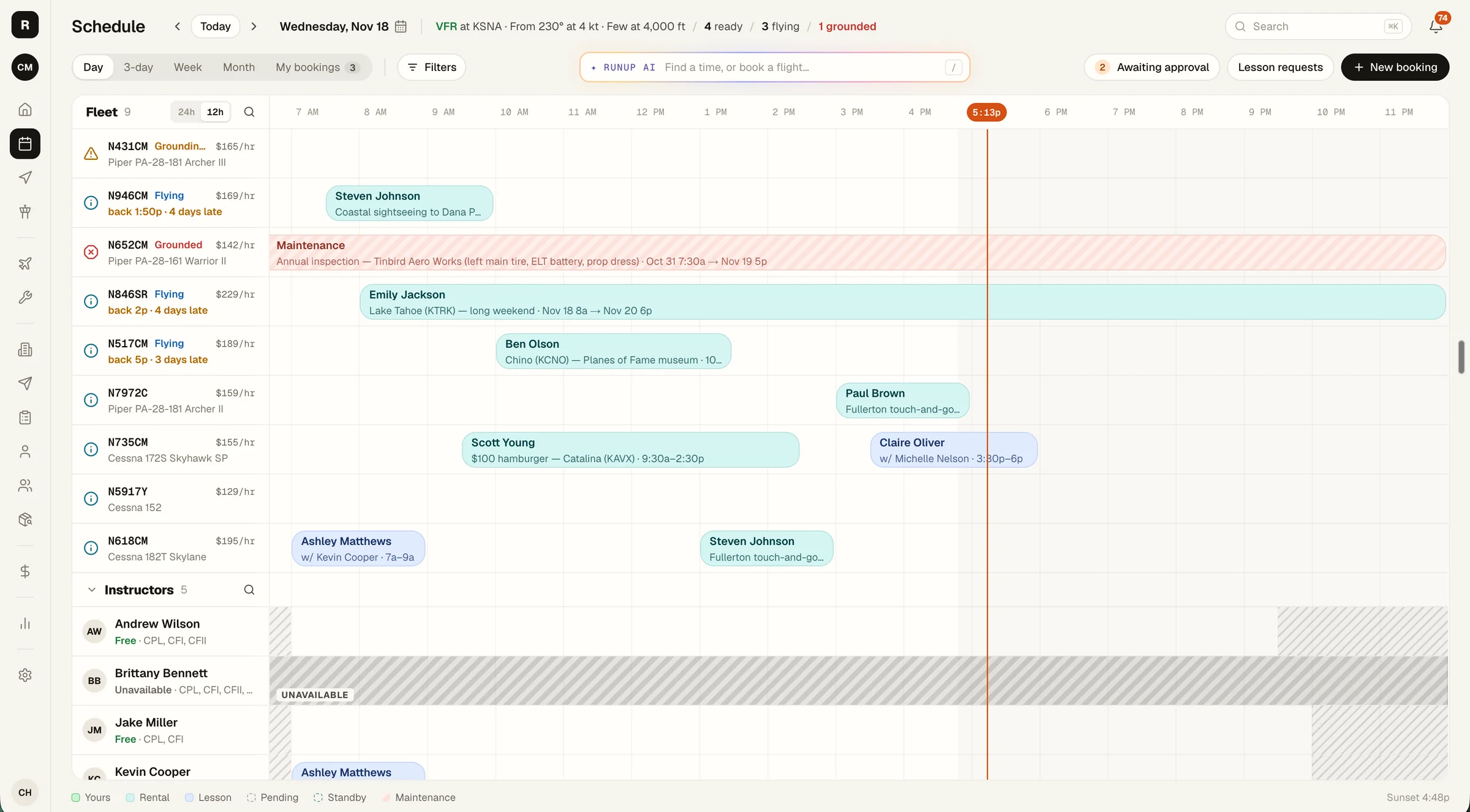
Booking calendar and aircraft schedule
Calendar sync: Google Calendar and Apple Calendar
Check-out and check-in with Hobbs and tach
Squawks, and aircraft grounding when a squawk needs it
Maintenance due dates: 100-hour, annual, ELT, transponder, ADs
Digital aircraft records
Members, pilot currency and medical reminders
Invoices from Hobbs or tach time
Notices by email, text and push
Communications center: email to all members, students, instructors, pilots checked out on an aircraft, or a custom list
Automatic reminders for members, students and staff: bookings, payments and more
Reporting and exports
Advanced scheduling: instructor availability, lesson requests, standby, approvals, recurring bookings, several bases
Advanced maintenance: work orders, parts, maintenance costs, MEL
Runup AI: chat, booking by chat, answers from your documents, debrief summaries
MCP server and API: connect Runup to your own AI tools and apps
Live tracking: ADS-B map, ETA for the next pilot
Operations: wiki, applications, forms, dues, cancellation fees, lost and found
Payments: card and ACH, prepaid balances, packages
Training: student records, debriefs, private CFI notes
Front desk: counter screen, member ID and PIN, card reader, intro flight paymentsAdd-on
TV boards: Plane Status and TodayAdd-on
Setup and data migration from your old systemSelf setup

Questions

Answers to the questions clubs and schools ask most.

Ask us a question

Flying clubs and flight schools. Runup does scheduling, dispatch, maintenance, billing, members, live tracking and training in one system.

Basic is for clubs with up to 3 aircraft. The Club and School plans start at 3 aircraft, with no top limit. School adds the training syllabus and student progress. If your club starts with 1 or 2 aircraft and needs more than Basic, contact us and we will find a plan that works.

No. Runup works in the browser on iPhone, Android, tablets and computers. Members can do everything on a phone that they can do on a computer.

Usually a few days to two weeks. We move your aircraft, members, bookings and maintenance records for you, and we do the setup. Your club does not have to.

Yes. Tell us how your club or school works. We make changes for your needs quickly.

No. One price per aircraft includes all the tools in your plan. The only extra charges are Runup AI use above your monthly allowance, and the TV boards or front desk add-on if you choose it.

No. Runup never takes a percentage of payments. You pay only the Stripe processing fees. Your club can pass the card fee to the member, and ACH bank payments are a free option for members.

Runup bills from the Hobbs or tach times that the pilot records at check-in. Your club sets wet or dry rates for each aircraft.

Runup AI is an assistant that is connected to all of Runup. Members ask it in plain words to book, change or find aircraft time. Admins ask it about squawks, aircraft status and the schedule. Runup AI can only see and do what that person can see and do in Runup. Each plan includes a monthly allowance, and Runup AI does not stop when you go above it.

Yes. The School plan includes the training syllabus and student progress. We are building the Part 141 program now, and we can make it ready quickly when a 141 school signs up.

Yes. Members can sync their bookings to Google Calendar or Apple Calendar. Outlook is not available yet.

Yes. Your club owns its data, and you can export it at any time. Runup also has an API, so your other systems can read and send data.

Yes. Your data is encrypted when it is sent and when it is stored. Each club can see only its own data. Two-step sign-in is available, and a club can require it for its members.

There is no setup fee and no long contract. Monthly plans can be canceled at any time. Yearly plans give you 12 months for the price of 10.

Yes. Start the demo to use Runup with a sample club. You do not need an account.